
 Get Ghostery for Chrome
Featured in




GHOSTERY TRACKER & AD BLOCKER
Puts you back in the driver’s seat!
Ghostery stops trackers, ads, and popups in Chrome and keeps your personal data private and off the data brokers’ wallets. Your personal data is your business!
Privacy Protection
Ghostery helps protect your privacy by stopping trackers from collecting information about your browsing activity. It also reduces exposure to malvertising, where online ads are used to distribute scams, unwanted software, or other malicious content. By blocking ads and connections to known malicious domains before they load, Ghostery adds another layer of protection while you browse. This works alongside its tracker blocking to limit unnecessary connections to third parties and keep more of your browsing activity private.
Transparency
Behind every website visit or search you make, trackers are recording and transmitting every step you take. Ghostery's Chrome tracker blocker extension neutralizes these trackers ensuring your peace of mind. Over the Tracker Panel, Ghostery displays the trackers that were identified and neutralized.
Speed & Focus
The more resources load on a website, the slower it gets. By decluttering the web, Ghostery's free Ad Blocker Chrome extension speeds up pages and avoids draining your internet bandwidth and battery.
Community Powered
Ghostery tracking protection is powered by many. Once a new tracker is detected by one of our users, everyone’s privacy improves. Our code is open source, everyone can investigate it. Browse the internet safer with Ghostery's Tracker & Ad blocker Chrome extension for free!
Ghostery Features
Engineered for Privacy Protection
Ghostery stops trackers on Chrome - blocks ads, cookies and popups - clicks you out of consent dialogues at each website visit.
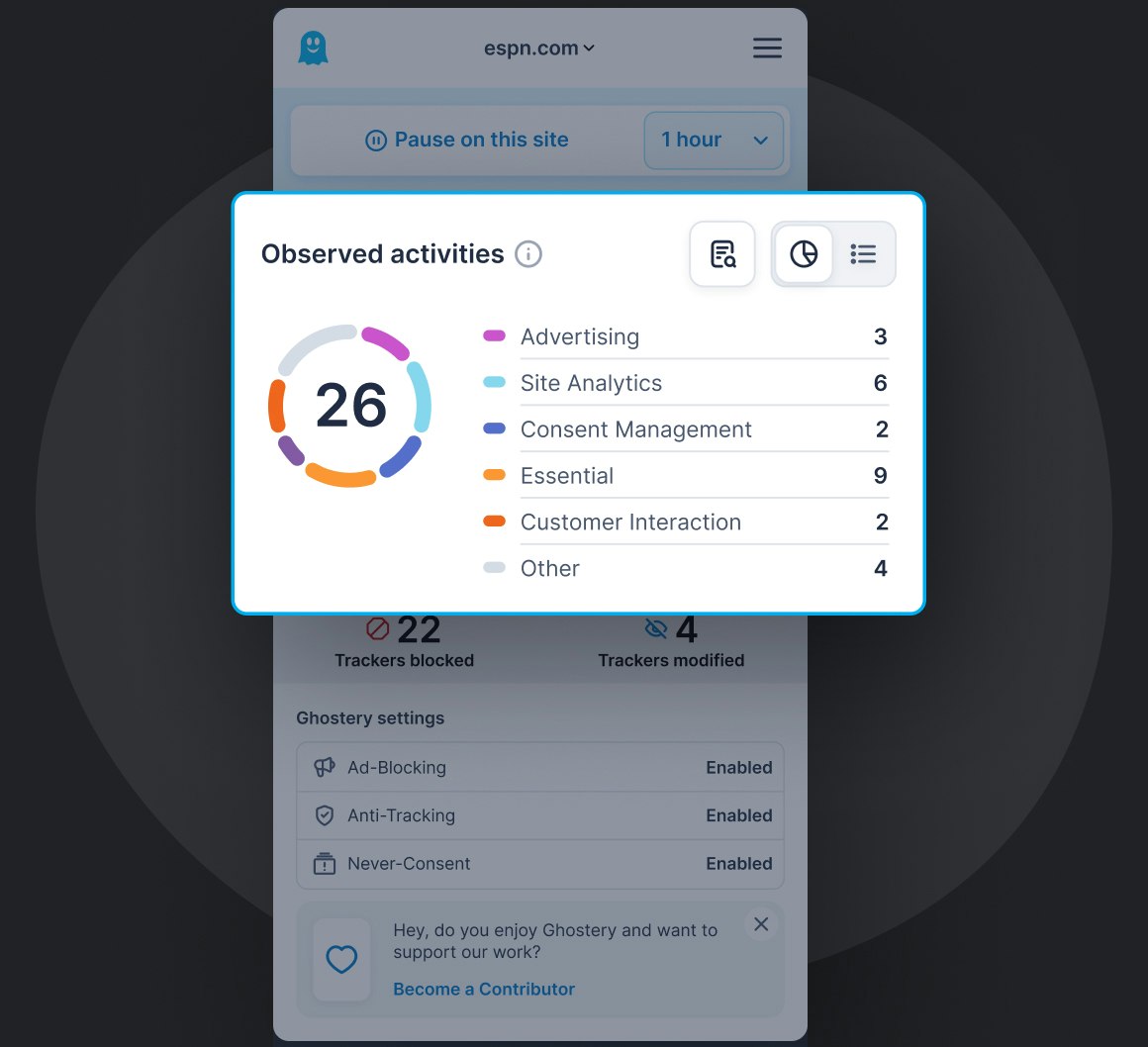
Ghostery Panel
Ghostery x-rays the web to display every tracker lurking behind the websites you visit.
To secure your privacy all trackers are neutralized. Your personal data are detached and replaced by random values, leaving data collectors in the dark about your identity.
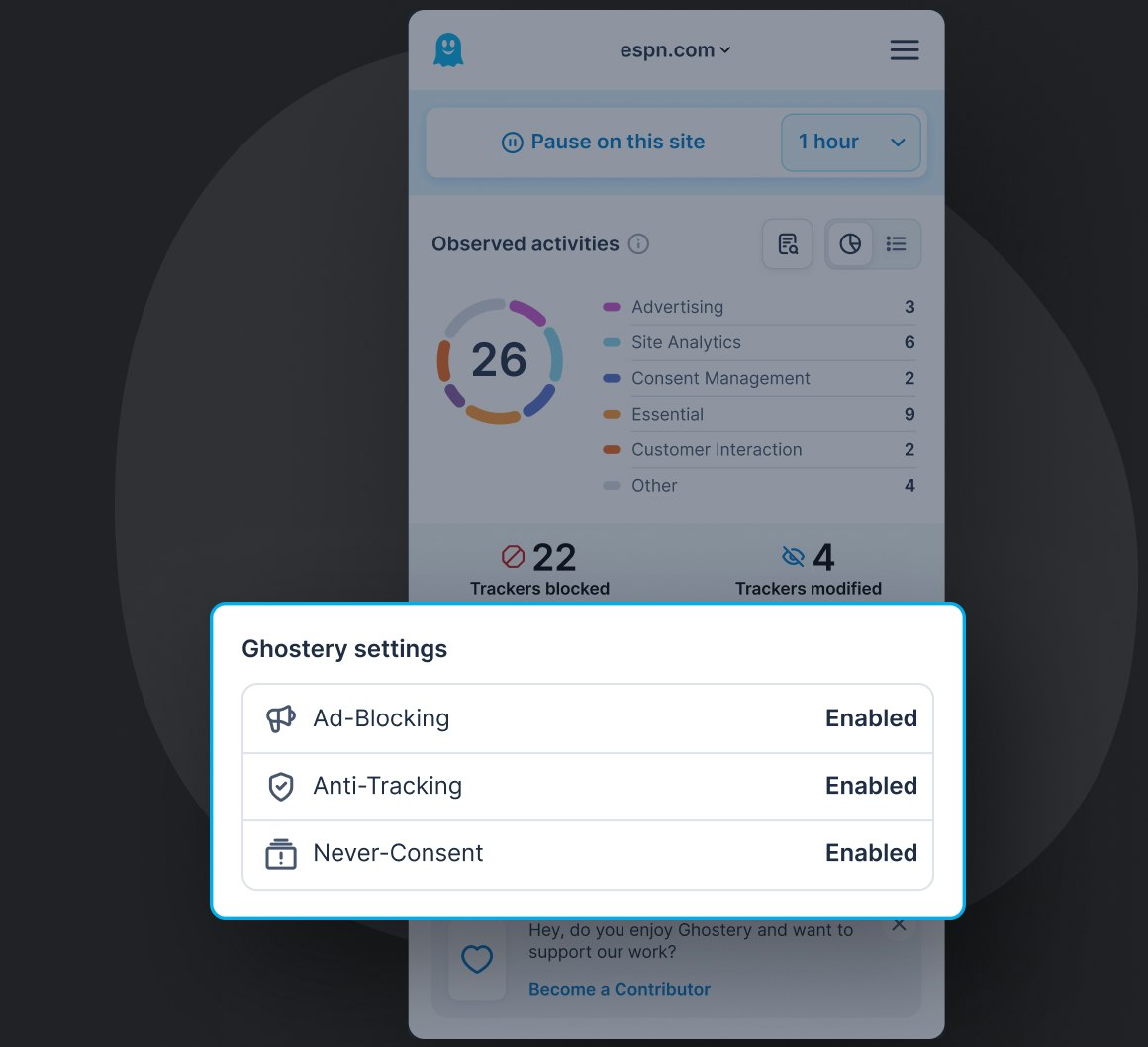
Privacy Building Blocks
Anti-Tracking
AI-driven technology neutralizing trackers’ ability to collect your personal data. Replacing it by random values it puts data brokers in the dark about your identity and sends a personal message of tracking being unacceptable.
Ad-Blocking
Removes all advertising and promotional content from the websites you visit, leaving you with a clutter-free, focused view on information. The less resources load on a page, the faster it gets.
Never-Consent
Clicks you out of all consent dialogues in favor of never tracking. This unequaled feature adds convenience to each website visit and acts like your globally active privacy advocate towards content providers.
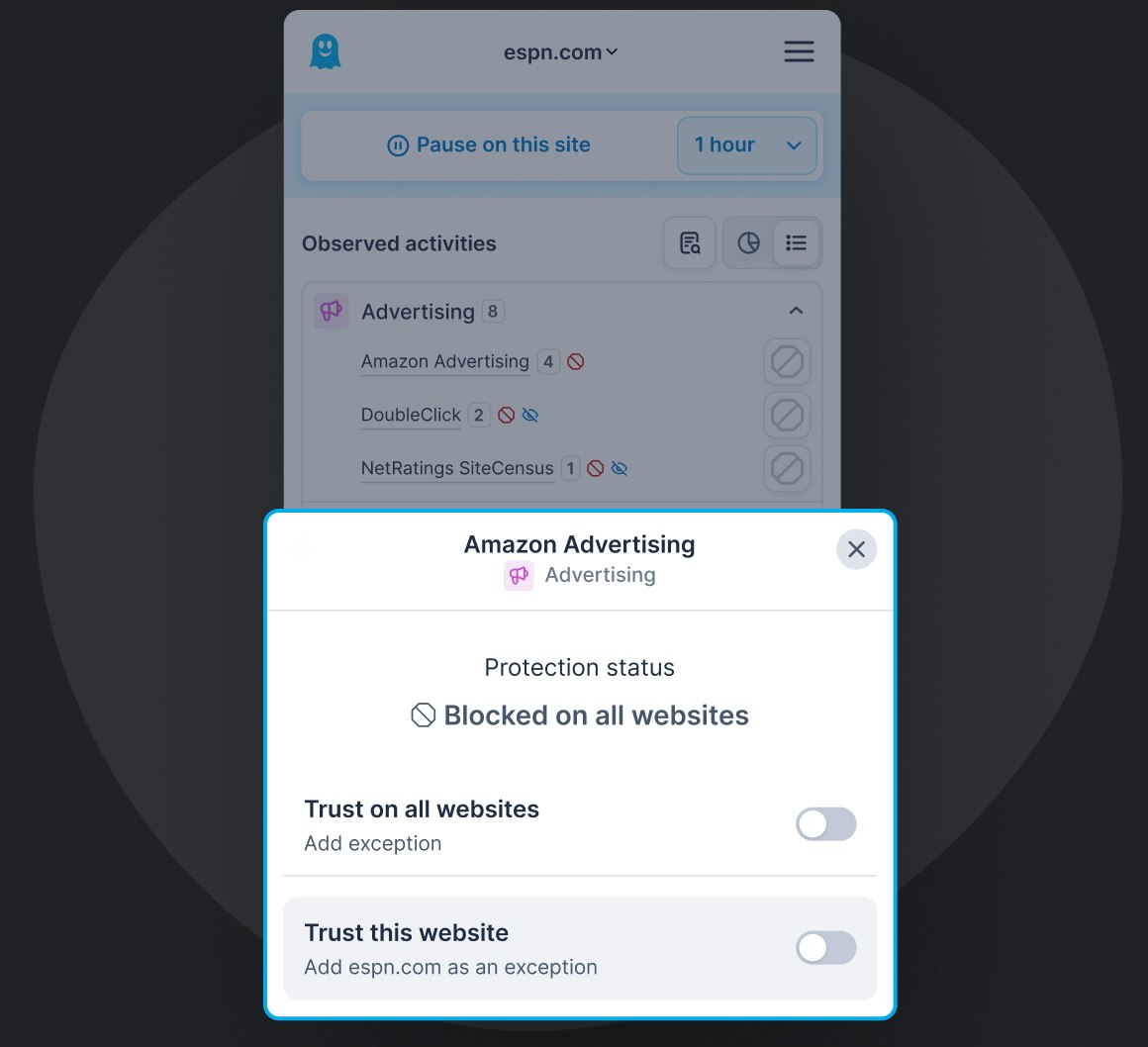
Customization
You’re in control!
Block or unblock individual trackers, hide content from pages you visit as you see fit. Reasons are up to you! Ghostery always acts in the interest of keeping your personal data private!
Over 100+ million Ghostery downloads for privacy protection
… Well done and thank you for your service to humanity.

 5.0
•
Chrome Web Store
5.0
•
Chrome Web Store
This is the best ever - No pop ups, no ads. It's supper efficient! My sports streams have never been better.
 5.0
•
Chrome Web Store
5.0
•
Chrome Web Store
Simply the best.
 5.0
•
Chrome Web Store
5.0
•
Chrome Web Store
A perfect 👌 ad blocker
5.0
•
Chrome Web Store
Seems proper, period. Every necessary element blocked with page fully loaded. Thank You.
 5.0
•
Chrome Web Store
5.0
•
Chrome Web Store
Thank you Ghostery for protecting me from intrusive YouTube ads! You're great!
 5.0
•
Chrome Web Store
5.0
•
Chrome Web Store
the annoying websites tracking sht is now gone. Perfect
5.0
•
Chrome Web Store
ITS SOO GOOOD!! i can go on diffferent websites without having to worry about how many times I click before I get an ad. Super helpful too.
5.0
•
Chrome Web Store
Having used Ghostery since 2016, I've loved it, even to the point that I’ve installed the browser on my android, just to watch youtube without adverts.
 5.0
•
Chrome Web Store
5.0
•
Chrome Web Store
Very effective. Love it.
5.0
•
Chrome Web Store
Join the Ghostery user community and protect your personal data online


Why Choose Ghostery Adblocker for Chrome?
Enhance your Google Chrome browsing with Ghostery, a powerful solution for a faster, cleaner, and more private online experience. As a free Google Chrome adblock, Ghostery helps remove visual clutter and interruptions, allowing you to browse the web without constantly being distracted by ads.
Ghostery delivers robust ad blocking on Chrome by removing intrusive advertisements across websites, including video ads on YouTube and major social platforms. Beyond ads, Ghostery blocks trackers and automatically suppresses cookie pop ups, helping protect your personal information from unnecessary data collection. By stopping trackers, autoplay videos, and third party scripts, Ghostery also improves page load speeds and overall browsing performance.
Ghostery is fully compatible with Chrome's Manifest V3 extension framework, so you can continue using it as Chrome moves away from older Manifest V2 extensions. Ghostery has adapted its blocking technology to work within Manifest V3 while continuing to provide ad and tracker protection in Chrome. Because Ghostery is actively developed and maintained for current Chrome versions, you don't need to rely on an outdated extension to keep unwanted ads and tracking under control. Updates are delivered through the Chrome Web Store, helping Ghostery keep pace with changes to Chrome and the wider web.
Among the many ad blockers for Chrome, Ghostery stands out for its focus on transparency and user control. Its detailed panel shows which trackers are active on each page, while flexible settings let you adjust protection levels or allow trusted sites when needed. Backed by an open source, community driven model and trusted by millions of users worldwide, Ghostery is a reliable choice for a faster, safer, and more private Chrome browsing experience.
Block ads, reduce tracking, and upgrade your Google Chrome browsing with Ghostery today.
FAQ: Tracker & Ad Blocker for Chrome
How do I Stop Chrome from Tracking?
You can turn on a “Do Not Track” request on Google Chrome, but for an extra level of security, we would recommend downloading Ghostery as a browser extension to ensure that any websites you visit won’t track you.
Can I Stop Google From Tracking Me?
Yes, you can. Download our free Ad Blocker Chrome extension and it will start blocking ads, trackers, cookies, popups, consent boxes, and other trackers.
Using the Ghostery ad & tracker blocker extension, your personal data are detached and replaced by random values, leaving data collectors in the dark about your identity.
Is There a Totally Free Ad Blocker Chrome?
Yes! Ghostery is a free ad blocker for Chrome that blocks ads and trackers without requiring a paid subscription for its core privacy protection. Once installed, it works automatically as you browse and gives you control over protection for individual websites. Ghostery is also open source, allowing anyone to inspect how its technology works. There are no hidden charges required to use its core ad and tracker blocking features, making it a practical option for everyday browsing on Chrome.
What Is The Best Chrome Extension Ad Blocker?
Ghostery, of course! Our Ad Blocker will also block trackers, cookies, popups and consent banners. It’s free and highly customizable, and can be easily added as a browser extension to Chrome, Safari, Firefox, Edge and Opera.
Are Ad Blockers Legal?
Yes, they are! It’s perfectly legal to block ads. Websites will always want to advertise and increase their bottom line, however, it's up to you whether you choose to consume that content or not. Our ad blocker extension blocks many ads on different platforms and yes, we block Youtube ads too.
How Do I Whitelist a Site in Ghostery on Chrome?
The Chrome Ad Blocker Ghostery allows you whitelist or allowlist a site by pausing Ghostery on it for a period of time.
If you need to temporarily trust a site for any reason and pause Ghostery activities, the default selection will appear as 1 hour, with the option to change it to 1 day, or Always, if you want to trust the site indefinitely.
Pause Ghostery as a global is also integrated and accessible from the settings. This allows you to globally pause Ghostery on all sites for 1 day.
Can I Use Ghostery With Chrome’s Built-in Ad Blocker?
Yes, Ghostery complements Chrome’s built-in ad blocker by providing additional ad blocking, tracker blocking and privacy features. This is more of an ad constrainer than it is an ad blocker. Multiple ads will still get through, even with the Google’s tool turned on. We recommend an adblocker browser extension like Ghostery.
How do I pin the Ghostery extension to the Chrome toolbar?
To pin the Ghostery extension in Chrome so it’s always visible in your toolbar for quick access and information, follow these steps:
- Click the 🧩 Extensions icon in the top-right corner of Chrome (it looks like a puzzle piece).
- In the dropdown list, locate Ghostery.
- Click the pin icon next to Ghostery. It'll turn blue, and Ghosty, the Ghostery icon will appear in your toolbar.
Now Ghostery will be readily accessible, no more digging through menus.
Does Ghostery Block Trackers and Stop Websites From Tracking Me?
Yes. Ghostery detects and blocks many tracking technologies that websites and third parties use to monitor browsing activity across the web. By preventing these trackers from loading or communicating with tracking services, Ghostery limits the information companies can collect about the websites you visit. No privacy tool can prevent every form of online tracking, but Ghostery significantly reduces common tracking methods while giving you visibility into the trackers detected on the websites you browse.
Does Ghostery Work With Chrome Manifest V3?
Yes, Ghostery is compatible with Chrome Manifest V3, the current extension framework used by Google Chrome. Ghostery has adapted its ad and tracker blocking technology to operate within Manifest V3 requirements while continuing to provide effective privacy protection. The extension is actively maintained as Chrome and its extension APIs evolve, so Chrome users can continue using Ghostery without relying on a legacy Manifest V2 extension. Updates are distributed through the Chrome Web Store as new Ghostery versions become available.
Can Ghostery Block YouTube Ads on Chrome?
Ghostery can block many types of ads that appear while watching YouTube in Chrome, including pre-roll and mid-roll video ads. YouTube regularly changes how advertising is delivered and how it responds to ad-blocking technologies, so results can vary over time. Ghostery is actively maintained to respond to changes across websites, including YouTube. If you encounter ads or unexpected playback behavior while using Ghostery, you can report the issue to the Ghostery team so it can be investigated.
Does Ghostery Protect Against Malicious Ads?
Ghostery helps reduce exposure to malvertising, where online advertising is used to distribute scams, unwanted software, or other malicious content. By preventing ads, trackers, and connections to known malicious domains from loading, Ghostery can stop potentially harmful resources before they reach your browser. This adds a useful layer of protection during everyday browsing, although an ad blocker is not a replacement for dedicated security software or safe browsing practices when dealing with downloads, suspicious links, or other online threats.
Will Ghostery Slow Down Chrome?
Ghostery is designed to work efficiently in Chrome and can actually reduce the amount of content your browser needs to load. Blocking ads, trackers, and other unnecessary third-party requests means fewer resources may need to be downloaded and processed when opening a webpage. This can contribute to faster page loading and a less cluttered browsing experience. Actual performance varies depending on the website, device, connection, and other extensions installed, but Ghostery is designed to provide protection without unnecessarily slowing down your browser.
Still have questions?
If there is anything you miss in Ghostery or have any questions, please drop a line to support@ghostery.com. We’re happy to talk to you anytime.
