 Get Ghostery for Firefox
Featured in




GHOSTERY TRACKER & AD BLOCKER
Puts you back in the driver’s seat!
Ghostery stops trackers, ads, and popups in Firefox and keeps your personal data private and off the data brokers’ wallets. Your personal data is your business!
Privacy Protection
Ghostery’s Tracker & Ad Blocker for Firefox takes protection to the next level. Ads, popups, and tracking scripts don’t just clutter your screen, they follow you and carry your personal data across the web. By using the Ghostery Ad Blocker for Firefox, you take back control and keep your personal information safe.
Transparency
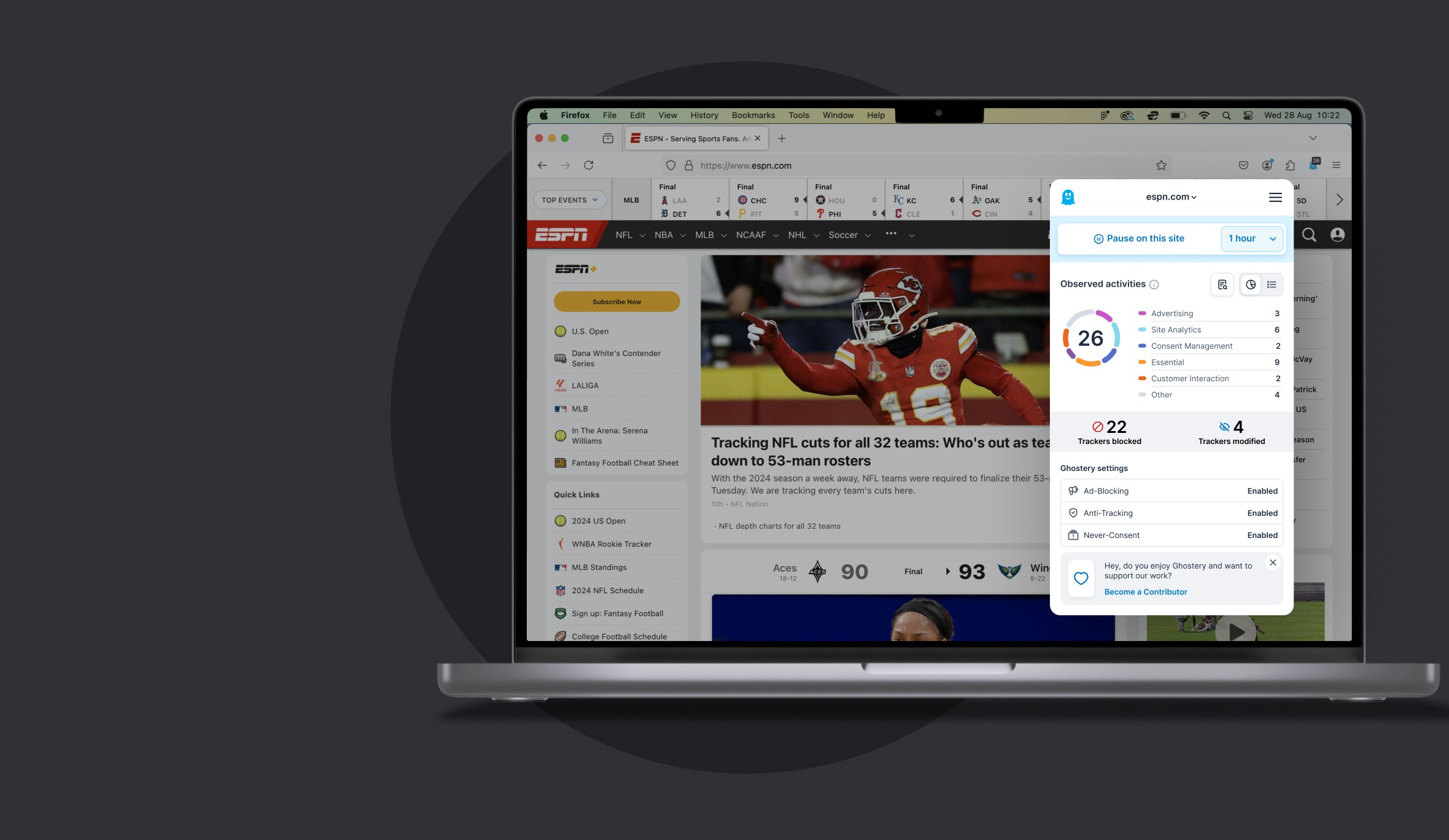
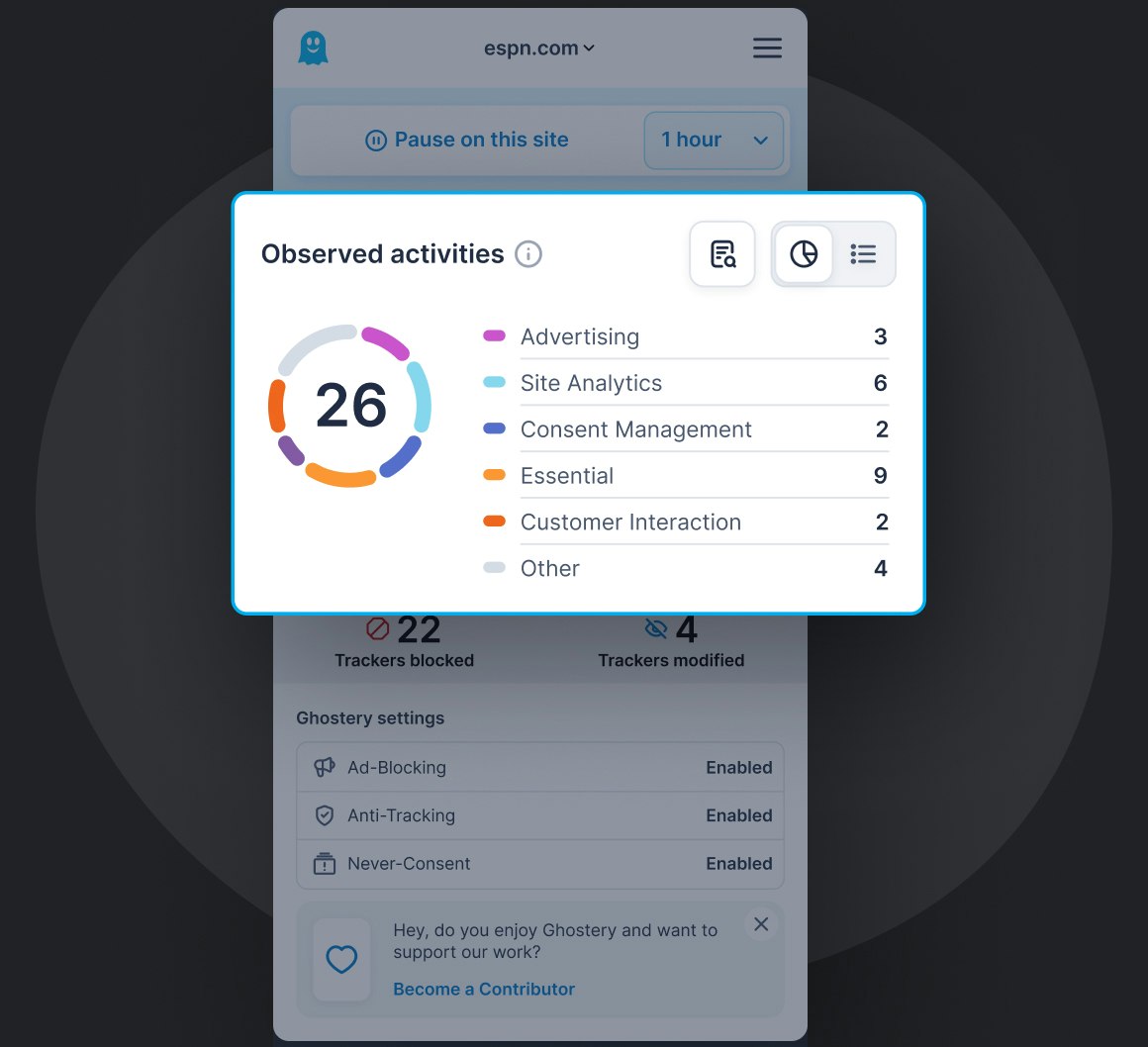
Every time you visit a website or perform a search, tracking scripts are quietly logging your activity and sending that data across the web. Ghostery’s Firefox tracker blocker extension puts a stop to that by neutralizing trackers in real time to protect your privacy and give you peace of mind. Through the Tracker Panel, Ghostery shows you exactly which tracking entities were detected, modified and blocked.
Speed & Focus
The more resources a website loads, the slower it runs. Ghostery’s Firefox Ad Blocker streamlines your browsing by decluttering the web and making pages load faster while saving your bandwidth and battery. It delivers a faster, cleaner and more focused web experience from the start.
Community Powered
Ghostery’s tracking protection is community-powered. When one user detects a new tracker, everyone benefits, boosting privacy for all. Our code is open source, so anyone can inspect it. Browse the web safer with Ghostery’s Tracker & Ad Blocker for Firefox, available on both mobile and desktop.
Ghostery Features
Engineered for Privacy Protection
Ghostery stops trackers on Firefox - blocks ads, cookies and popups - clicks you out of consent dialogues at each website visit.
Ghostery Panel
Ghostery x-rays the web to display every tracker lurking behind the websites you visit.
To secure your privacy all trackers are neutralized. Your personal data are detached and replaced by random values, leaving data collectors in the dark about your identity.
Privacy Building Blocks
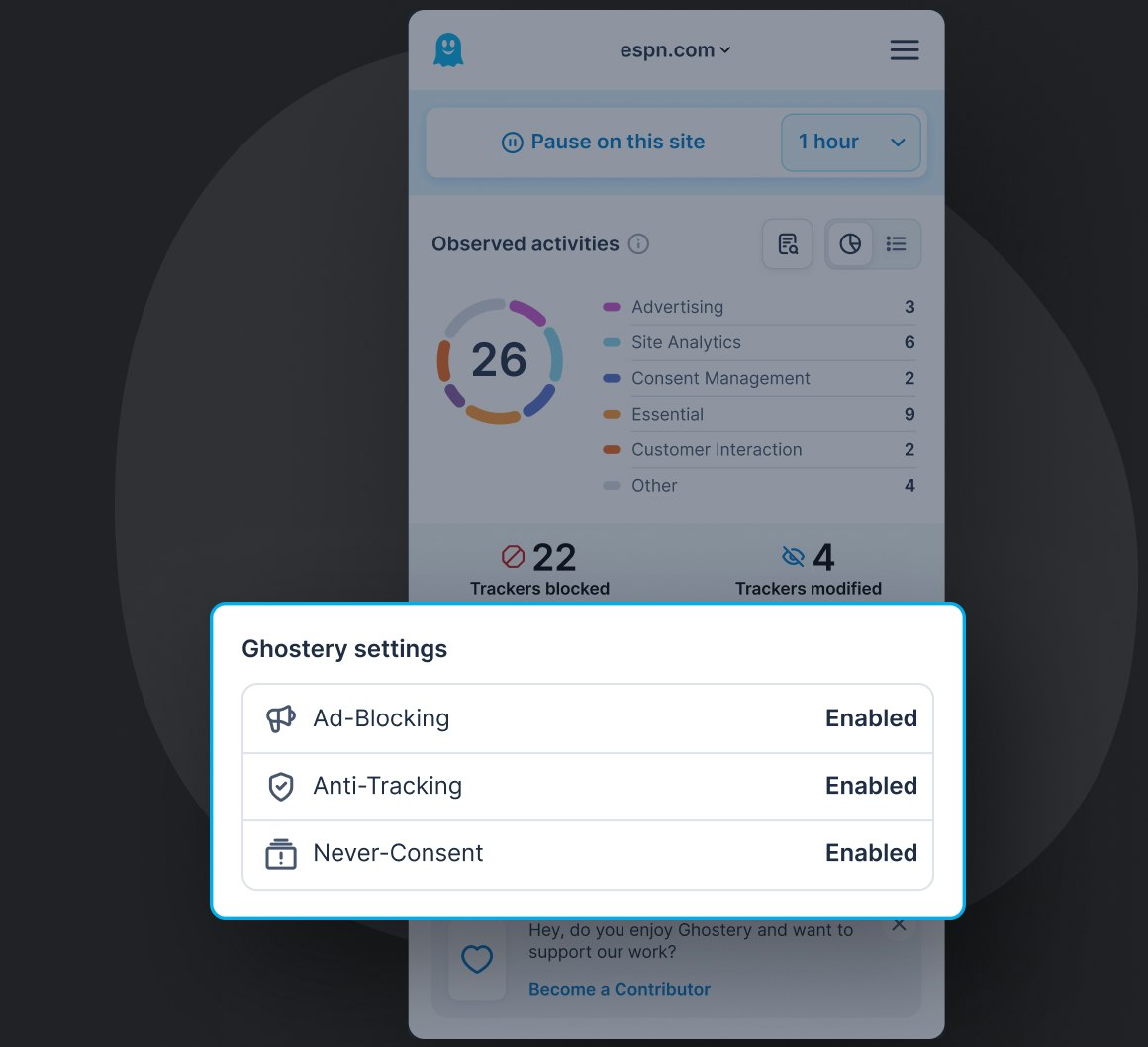
Anti-Tracking
AI-driven technology neutralizing trackers’ ability to collect your personal data. Replacing it by random values it puts data brokers in the dark about your identity and sends a personal message of tracking being unacceptable.
Ad-Blocking
Removes all advertising and promotional content from the websites you visit, leaving you with a clutter-free, focused view on information. The less resources load on a page, the faster it gets.
Never-Consent
Clicks you out of all consent dialogues in favor of never tracking. This unequaled feature adds convenience to each website visit and acts like your globally active privacy advocate towards content providers.
Customization
You’re in control!
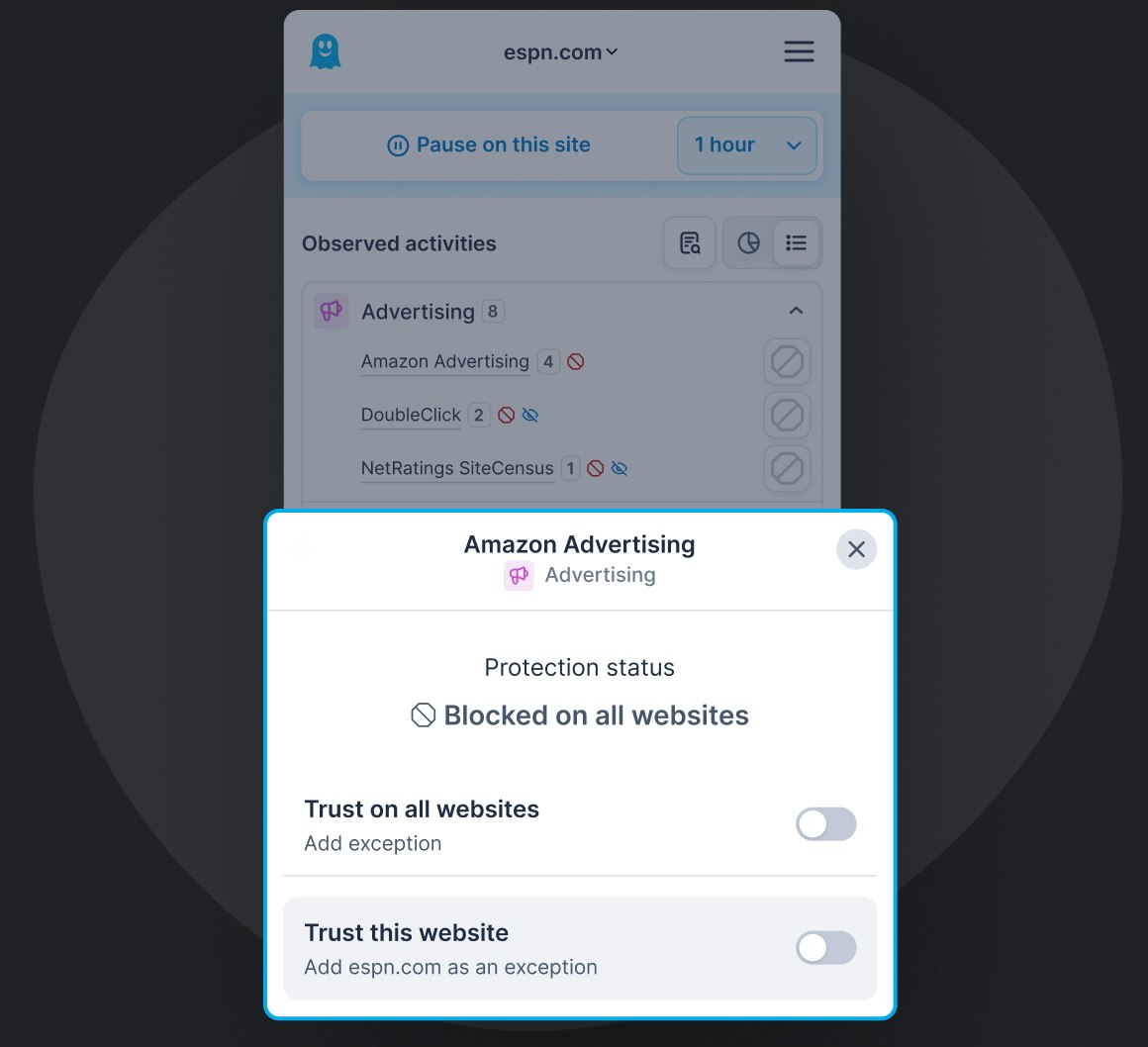
Block or unblock individual trackers, hide content from pages you visit as you see fit. Reasons are up to you! Ghostery always acts in the interest of keeping your personal data private!
Over 100+ million Ghostery downloads for privacy protection
Has to be the best overall privacy protector I have ever had the privilege of using. Thank you Ghostery.

 5.0
•
Firefox Browser ADD-ONS
5.0
•
Firefox Browser ADD-ONS
Best ad-blocker I've ever used! I love the Ghostery 10 redesign and 'Never Consent'!
 5.0
•
Firefox Browser ADD-ONS
5.0
•
Firefox Browser ADD-ONS
Realmente felicidades para los desarrolladores!! Eficaz y fluida aplicación!! Muchas gracias!
 5.0
•
Firefox Browser ADD-ONS
5.0
•
Firefox Browser ADD-ONS
Guay
 5.0
•
Firefox Browser ADD-ONS
5.0
•
Firefox Browser ADD-ONS
I would not even consider traveling to a site without Ghostery leading the way.
5.0
•
Firefox Browser ADD-ONS
Amigable, ligero y muy seguro; por lo tanto una add-ons extensión muy recomendable e indispensable para una saludable navegación en red y nube. Gracias
 5.0
•
Firefox Browser ADD-ONS
5.0
•
Firefox Browser ADD-ONS
Love this Privacy Ad Blocker. Unobtrusive and effective.
 5.0
•
Firefox Browser ADD-ONS
5.0
•
Firefox Browser ADD-ONS
Has worked well for me. Tools such as this that protect your privacy online are increasingly important.
 5.0
•
Firefox Browser ADD-ONS
5.0
•
Firefox Browser ADD-ONS
no idea bout privacy but ..I can't make without you. no more have-to-answer to cookies requests, pages are lighter without animated banners [...] Thanks so much!
5.0
•
Firefox Browser ADD-ONS
Join the Ghostery user community and protect your personal data online
Allowing ads on websites you choose
Ghostery gives you control over where blocking is active. If you trust a website or want to support it through advertising, open the Ghostery panel and pause protection for that site. You can choose a temporary pause or trust the site permanently, creating an allowlist while Ghostery continues blocking ads and tracking elsewhere.
The same approach can help when you want to support creators on video platforms. On YouTube, for example, Ghostery currently applies protection controls at the website level rather than permanently allowlisting individual channels. You can pause protection on YouTube when you want ads to appear, then turn it back on when you are done. This gives you a simple way to decide where ads are allowed without switching off Ghostery across the rest of the web.
Why Firefox still supports full ad blocking
Firefox continues to support powerful content-blocking extensions because Mozilla has kept support for both Manifest V2 and Manifest V3. Manifest is the framework that defines what browser extensions can do and which browser APIs they can use. While Chromium-based browsers have moved away from Manifest V2, Firefox continues to support the blockingWebRequest capability used by full-featured content blockers.
Firefox also supports blockingWebRequest in Manifest V3, giving extension developers more flexibility over how network requests are filtered. For users, that means Firefox can continue supporting advanced ad and tracker blocking, making it possible to block ads in Firefox without relying only on the more restrictive filtering model used by some Chromium browsers. Ghostery can therefore use Firefox’s extension capabilities to block unwanted advertising and tracking scripts in real time while remaining actively maintained as Firefox evolves on supported Firefox versions.
FAQ: Tracker & Ad blocker for Firefox
Can Firefox block trackers?
Firefox does allow you to block some trackers using its enhanced tracking protection feature but Ghostery offers you a more robust service to block trackers. Download our Firefox Ad Blocker for free to block trackers, popups, consent boxes and more. Enjoy the internet while limiting unwanted tracking.
How do I block online trackers?
You can stop trackers by downloading our Ad Blocker. Our Firefox extension blocks cookies, popups, consent boxes and many other trackers. Our AI tracker replaces your details with random values - making sure that your personal data is untrackable.
How do I stop Google tracking in Firefox?
While you can block specific website trackers on Firefox, Ghostery offers superior tracker blocker features including stopping cookies, popups, and we also block ads! It's fast and easy. Get started by downloading the Ghostery Ad blocker extension to ensure that all online trackers are blocked and your personal information is kept private.
Does Firefox have an ad blocker?
Yes, Firefox has built in ad blocking capabilities. However, as their own team puts it, most users choose to use ad blocker extensions such as Ghostery for better results. The Ghostery ad blocker for Firefox works on a large range of websites and it can also block Youtube ads!
How do I stop all online ads on Firefox?
You can stop all online ads by downloading our Firefox ad blocker extension. Additionally our extension also blocks cookies, popups & other harmful trackers!
What is the best free ad blocker for Firefox?
Ghostery’s ad blocker for Firefox is one of the best ad blockers currently on the market. Our ad blocker is safe, effective and free to use.
It blocks ads, popups, and trackers in real time, helping websites load faster while protecting your personal infromation. With features like the Ghostery Panel, an intuitive interface that provides detailed insights every time a website loads, you get full visibility and control over what’s happening behind the scenes. Whether you're a casual user or want to explore deeper, Ghostery adapts to your browsing style on both desktop and mobile.
Does Ghostery have a feature to bypass consent dialogs?
The "Never-Consent" feature in Ghostery not only bypasses consent dialogs but also automatically selects more restrictive tracking settings for the user. This careful balancing act ensures stronger protection while minimizing website breakage, clearly signaling to publishers that Ghostery users prioritize privacy but still desire a functional browsing experience.
Is Ghostery available on mobile versions of Firefox?
Yes, Ghostery is available on mobile versions of Firefox. You can use it as ad block Firefox on Android by downloading and installing the free Ghostery extension from the Mozilla Add-ons page for Firefox on mobile. Once installed, it helps block ads and trackers and improves page loading speed. This gives you better privacy, a cleaner browsing experience, and more control over what loads on your device.
Do I have to pay for Ghostery?
Ghostery is free to use for everyone. The Ghostery browser extension provides core features like ad blocking, anti tracking, and with "Never-Consent" you not only bypass cookie consent dialogs but also optimal privacy settings are automatically selected for the user.
How does Ghostery protect my privacy on Firefox?
The free Firefox extension Ghostery helps reduce tracking on Firefox browser by blocking trackers and ads, which prevents third-party data collection and improves browsing speed. It also offers automatic cookie management to control and minimize personal data leakage. These features collectively help protect your personal information, making browsing more secure, efficient and seamless.
Can I customize Ghostery's blocking settings in Firefox?
Yes, you can customize Ghostery's blocking settings in Firefox. Ghostery recommends using default settings in the Firefox ad blocker but it allows you to adjust its features to suit your preferences. Whether you use it as ad block Firefox or across other browsers, you can choose to block all trackers and ads by default, or fine-tune the settings to allow certain types of trackers or ads from websites you trust or want to support. This level of customization provides flexibility in balancing protection, site functionality, and support for the web services you value.
How does Ghostery improve browsing speed on Firefox?
Ghostery Firefox ad blocker improves browsing speed primarily by blocking trackers and ads, which often consume data and increase page load times. With Ghostery, your pages load almost 2x faster on average, and you use 25% less energy. This streamlined approach not only reduces unnecessary tracking but also significantly speeds up the overall browsing experience, making websites load faster and operate more smoothly.
How do I pin Ghostery to the Firefox toolbar?
To pin the Ghostery extension in Firefox and keep the icon visible at all times, follow these steps:
- Click the puzzle piece icon (🧩) in the Firefox toolbar. This opens your list of installed extensions.
- Find Ghostery in the list.
- Click the gear icon next to Ghostery.
- Select "Pin to Toolbar".
Ghosty, the Ghostery icon should now appear directly in your main toolbar for quick access.
If you still don’t see it, you can also go to: Menu (≡) > Extensions and themes >, Extensions >, find Ghostery, click the three dots, and choose Pin to Toolbar.
Now Ghostery will stay visible while you browse.
Can Ghostery block video ads?
Yes. Ghostery is designed to block most types of ads across the web, including many video ads such as pre-rolls, mid-rolls, and embedded video ad units on popular platforms. This also applies when you use it as ad block Firefox, Chrome, Edge, or other supported browsers. However, some streaming and video platforms continuously change how they deliver ads, which can occasionally make video ads slip through until we update our protections. Our team and community actively maintain blocking rules and technologies to keep video ad blocking effective, including efforts to block ads on Youtube.
If you ever notice video ads getting through, make sure Ghostery browser extension is updated to the latest version, try refreshing the page, or contribute to improved coverage by reporting the site through the Ghostery panel. Ghostery remains free, open-source, and focused on giving you control over your browsing experience.
How do I install Ghostery on Firefox?
Install Ghostery on Firefox by opening the Ghostery page on Mozilla Add-ons and selecting Add to Firefox. Review Firefox’s permission request, confirm the installation, and Ghostery will begin blocking ads and tracking scripts automatically. For quick access, open Firefox’s Extensions menu, find Ghostery, select the settings icon, and choose Pin to Toolbar. Ghostery also works with Firefox on Android, where it can be installed from Mozilla’s mobile add-ons directory.
What permissions does the Ghostery Firefox extension need?
Browser extensions that block ads and tracking need permission to access website and network activity because content-blocking extensions work by inspecting and modifying web requests as pages load. Ghostery uses these permissions to identify advertising and tracking scripts, block unwanted connections, and apply protection across the websites you visit. Firefox may describe this broadly as access to browser tabs, navigation activity, or website information. These permissions enable Ghostery’s core functionality and do not mean that Ghostery collects your browsing activity.
Does Ghostery block malicious ads and phishing sites?
Ghostery helps reduce exposure to malicious advertising by blocking ads, tracking scripts, and connections to known malicious domains before they load. This can prevent some malvertising, scams, and phishing attempts delivered through advertising networks from reaching your browser. Ghostery is not a dedicated anti-phishing or antivirus product, so it should complement Firefox’s built-in security protections and safe browsing habits rather than replace them, especially when opening suspicious links, downloads, or unfamiliar websites.
Still have questions?
If there is anything you miss in Ghostery or have any questions, please drop a line to support@ghostery.com. We’re happy to talk to you anytime.
